User Guide
Updating and Submitting Timesheets
Follow these steps to review and edit your timesheet, then submit it when it’s ready:
- Navigate to the 'Timesheets' section in the left menu and click on the "My Timesheets"
- Click the edit icon on selected timesheet
- If you need to update the request, click the button "Edit", perform changes, and confirm by clicking on the button "Save".
- Once the timesheet is complete, click the "Submit" button to send it for approval.
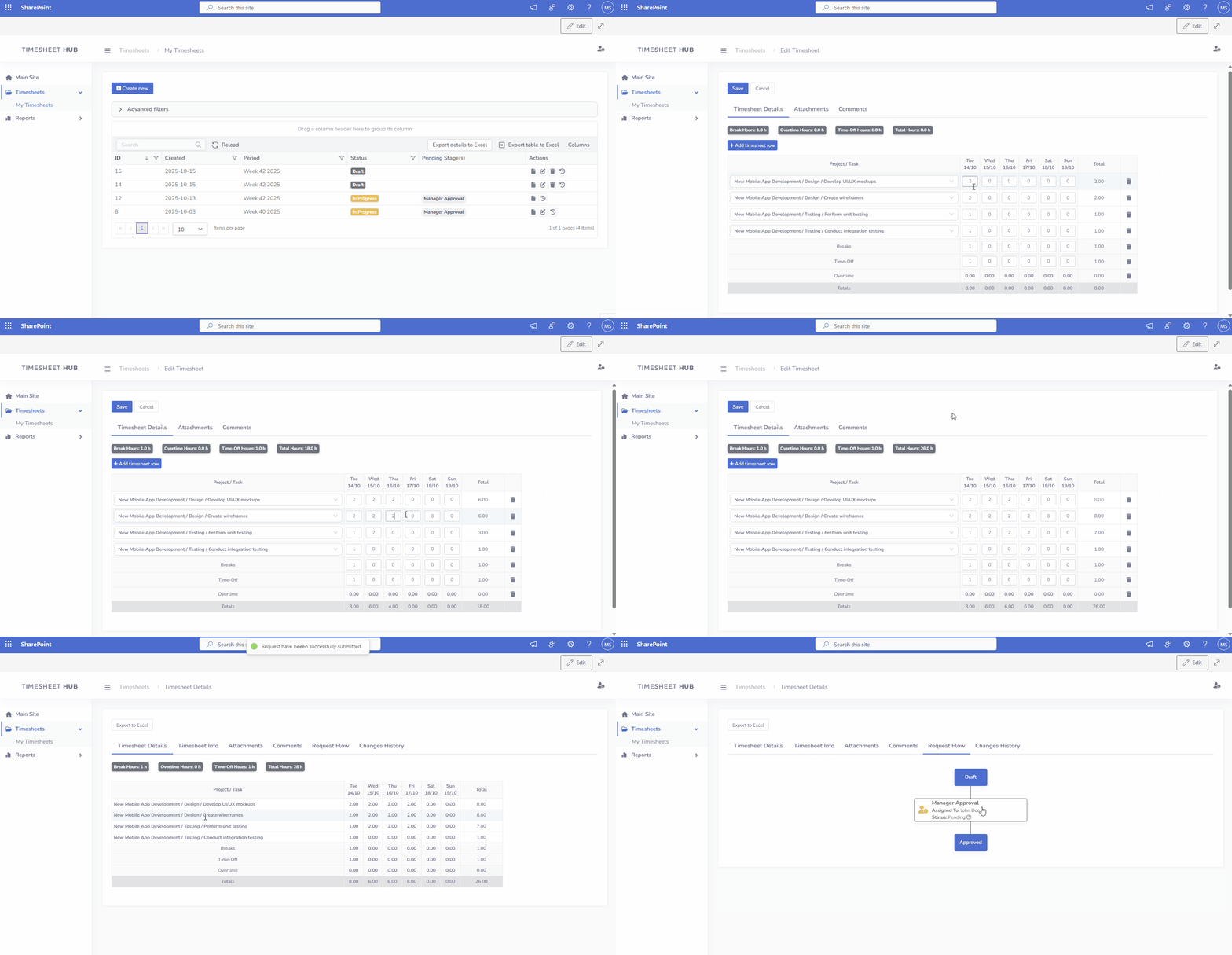
Request details page consists of the following tabs:
- Timesheet Details Contains the main information about your timesheet, including projects, tasks, and recorded hours.
- Timesheet Info: Displays key metadata about the timesheet, such as its status, period, and other related details.
- Attachments: Allows you to manage additional documents related to the request.
- Comments: Facilitates communication and collaboration on the timesheet.
- Request Flow: Visualizes the approval process and current timesheet status.
- Changes History: Tracks all modifications made to the timesheet.