
A single approval route rarely fits every request. A small purchase may need only a direct manager. A larger purchase may require finance. Security may need to review a new supplier in parallel, while the requester's department head reviews the budget.
Conditional approval workflows solve that problem by applying rules at the moments where the process changes. Instead of maintaining separate email instructions, you encode the decisions once and let the workflow route each request consistently. The same approach works for conditional approvals for SharePoint and conditional approvals for Microsoft 365 when the form, policy and approval history live together.
Why conditional approvals need a structured process
What conditional approvals mean
A conditional approval workflow evaluates information in the request and changes the next action accordingly. The condition might be based on the requested amount, department, location, request type or longer approval chain. The result determines who receives the next approval or task.
A basic example is a threshold rule: requests up to a certain value go to the manager, while higher-value requests also go to finance. A more advanced example can combine rules: the requester's manager always approves, but procurement is added only for new vendors and only when the purchase exceeds the department budget.
Choose the workflow pattern that fits the policy
Sequential approval
One stage follows another. This pattern works when a later approver should see the previous decision, such as manager approval followed by finance approval.
Parallel approval
Two or more approvers review the same stage at the same time. This reduces waiting when the reviews are independent, for example when a department and procurement must both sign off on a purchase.
Mixed approval
A sequence contains a parallel stage. The business might require manager approval first, then simultaneous finance and procurement reviews, followed by a task to place the order.
Task-based follow-up
The workflow moves past a decision but still requires action. A training request might end with a task asking the requester to upload a certificate before completion.

How to design a conditional approval flow
- Map the decision tree. Write down every place where the process changes and what information triggers the change.
- Choose the right template. If request types have different fields or permissions, split them into separate templates rather than adding too many conditions to one form.
- Design the form around decisions. Make required data easy to capture and reuse in conditions. A clear amount field is safer than asking finance to interpret a value inside a comment.
- Build approval stages. Assign named users or groups and decide which stages are sequential or parallel.
- Add tasks only where work is needed. Avoid turning every approval into a task; use tasks for follow-up responsibilities that must be completed.
- Test exception paths. Submit requests below and above each threshold, use a rejected request, and verify that a resubmitted request follows the correct route.
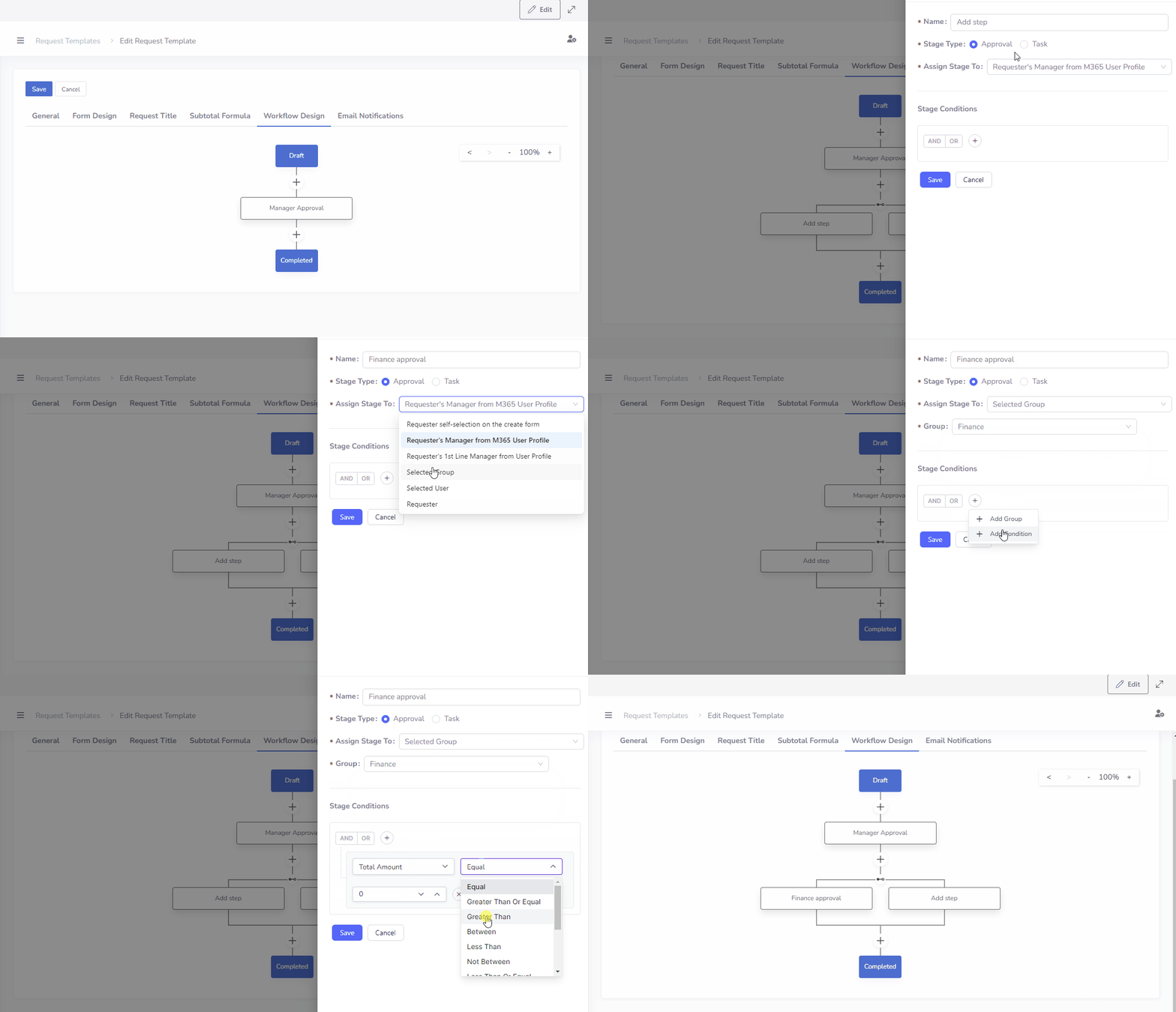
Example: a purchase request with three possible paths
Suppose a company uses the following policy:
- The direct manager approves every purchase request.
- Finance approves requests above 2,000 in the company currency.
- Procurement reviews requests for new vendors in parallel with finance.
- IT receives a task when the request includes hardware.
The requester fills in one form. The manager's stage is fixed. Finance and procurement appear only when their conditions are met. After approval, the IT task appears only for hardware requests. The policy remains visible in the workflow instead of depending on an administrator's memory.
What improves for the business
Less coordination
Employees no longer need to know which approvers and tasks belong to each request. The template applies the company rule automatically.
More accountability
Approvers know exactly when a request is assigned to them. Comments, checklists and the audit log preserve context and decisions.
How Approvals Hub supports conditional approvals in Microsoft 365
Approvals Hub supports request templates, custom forms, a Flow Builder with conditional logic, sequential and parallel stages, tasks, user groups, notifications and role-based permissions. Because the application runs in SharePoint and Teams, approvers can act from the collaboration tools they already use.

Build your first conditional approval workflow
Approvals Hub brings the process into SharePoint and Microsoft Teams, where your team already works. Data remains in your Microsoft 365 tenant, and approval responsibilities stay visible.
Frequently asked questions
Can a workflow combine sequential and parallel approvals?
Yes. A mixed workflow can start with one approval and then send several independent approvals in parallel.
Can conditions depend on a user group?
Yes. Approvals can be assigned to users or groups, and a group can be included only when the workflow condition is met.
What should happen after a rejection?
Define this as part of the process. The requester should understand why the request was rejected and whether it can be corrected and resubmitted.
Can administrators see who changed a workflow?
The central audit log records operations such as edits and deletions, giving administrators a reliable history.